Open your GPX route and see the nests along it.
Already planned the ride? Open the GPX file and Motonest draws the route with the places along it: where to sleep, where to fix the bike, where to stop for the view.


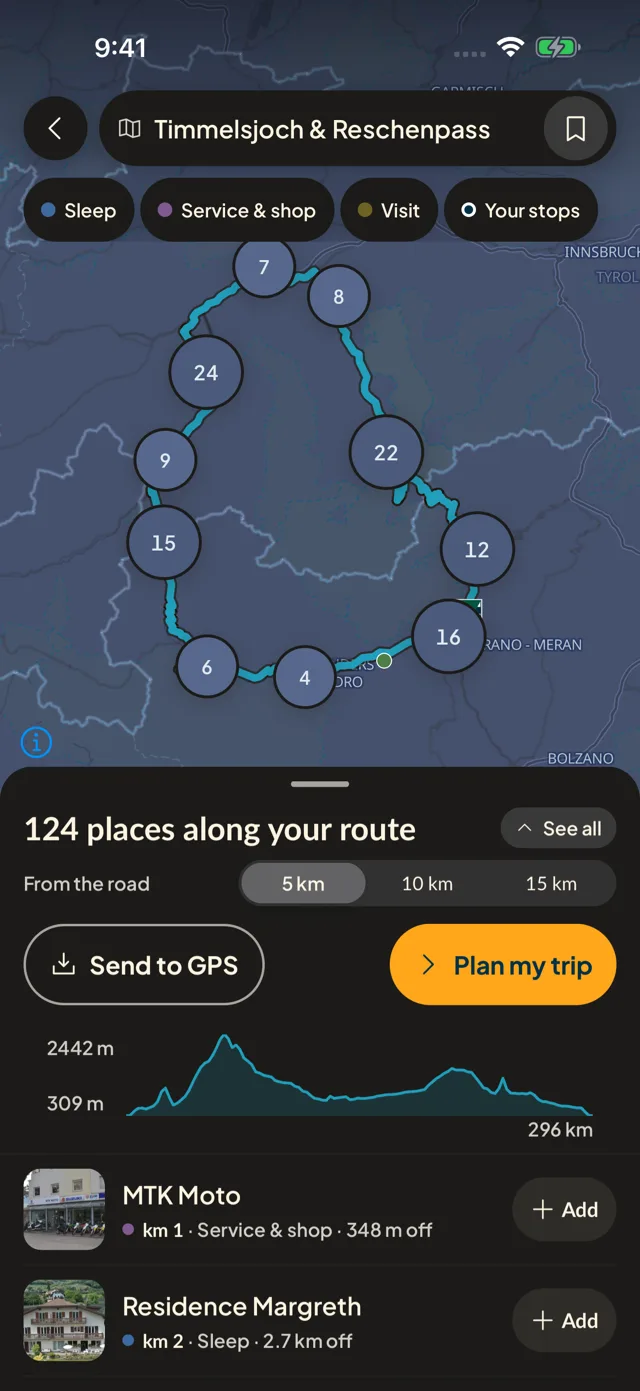

Open it, see it
Choose a GPX file on your phone, or open it with Motonest from another app. The route appears with its nests in road order, no account needed.
You choose the distance
Show the places within 5, 10 or 15 km of the route, grouped as sleep, service and shop, or visit, and add the ones you want as stops.
Take it with you
Send the places to your GPS, export the route as a GPX with your stops, or keep it as a trip split into days with a bed each night. Saving and exporting need a free account.
Questions riders ask
How do I find accommodation along a GPX route?
Open the GPX file in Motonest. The route appears with the nests along it, and the places to stay are listed in road order.
Do I need an account to open a GPX file?
No. Opening a route and browsing the nests along it is open to everyone. A free account is needed only to save the route or export it as GPX.
Which GPX files work?
A file with a full route or track, up to 20 MB. A file that holds only saved points has no route to draw: export the route from your planner instead.
Does it work without signal?
The nests along your route are read from the places stored on your phone. If they are not there yet, the app asks you to download them first, then you choose the file again.
Free to download, free to use. No ads.
More of what the app does